![kb_logo.svg]](https://www.talentdesk.io/hubfs/kb_logo.svg)
On TalentDesk, you may want require a second set of eyes and final stamp of approval on any service orders - worksheets, expenses, or proforma invoices - submitted by users in your network who receive payments through the platform. This is called 'Second level of financial approval' and can be enabled in your organization settings.
Settings
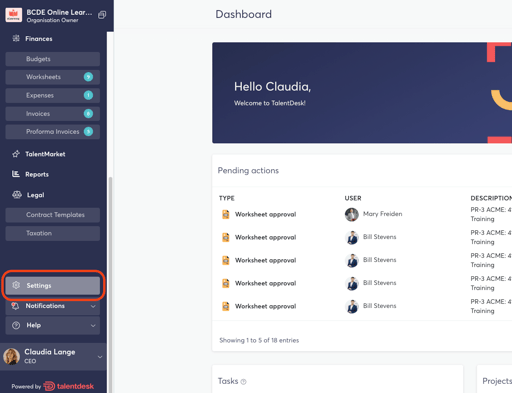
Open your account settings at the bottom of your sidebar menu
Payments
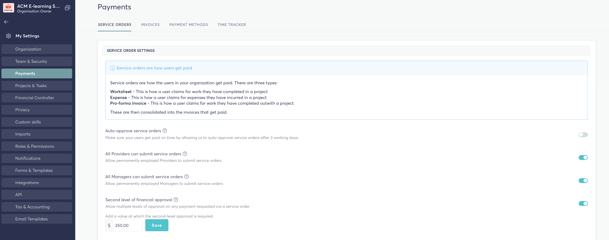
Locate the Payments setting and under Service Orders scroll down to Second level of Financial approval. Toggle the setting on/off depending on whether you would like to activate or deactivate this feature for your organization.
By default, the Organization Owner and any designated Financial Controllers will have authorization to access and approve all service orders for second level of approval.
When a service order has been reviewed and approved by a project owner, the status will change from Submitted (by the Provider) to Confirmed (by the project manager). When the the service order has been been approved a second time, the status will change from Confirmed to Approved and will be included on your next consolidated TalentDesk invoice.
You can also set a minimum threshold amount for this feature. Service orders at or above this amount will require two levels of approval, while those below it can be approved in a single step. By default, the threshold is set to 0, meaning all service orders require two approvals.
Payments Reviewer
A Payments Reviewer can be assigned at the project level should a second level of approval need to be assigned to a specific manager who is member of the project team.
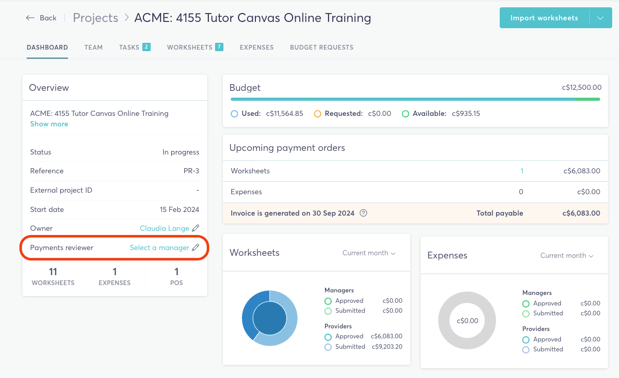
If second level of approval should sit only with designated Financial Controllers or the Organization Owner, do not assign a Payments Reviewer in the project.
Learn More
Second Level of Approval - Payments Reviewer